

A website can look good, load reasonably well, and contain plenty of useful content but still struggle to attract visitors from Google. Sometimes the problem is easy to spot, such as a page that takes too long to load. In other cases, the issue is less obvious. Important pages may not be indexed, content may not match what people are searching for, or internal links may make it difficult for visitors and search engines to discover related information.
This is where an SEO audit becomes useful.
An SEO audit helps website owners understand what is working, what needs attention, and which improvements deserve priority. Rather than making random changes in the hope of improving rankings, an audit provides a clearer picture of a website’s current search performance.
The process does not have to be complicated. With the right tools and a systematic approach, businesses can identify common problems and create a practical plan to address them.
What Is an SEO Audit?
An SEO audit is a structured review of a website to identify issues that may affect its visibility in search engines, usability, and organic search performance.
It typically covers technical SEO, indexing, on-page elements, content quality, internal links, backlinks, mobile usability, and page performance.
To conduct an SEO audit, start by checking whether important pages can be crawled and indexed. Then review technical errors, page titles, content relevance, links, website speed, and search performance. Finally, prioritize the findings and make improvements based on their likely impact and urgency.
Why Is an SEO Audit Important?
Websites change over time. New pages are published, old content becomes outdated, plugins are installed, and website structures are adjusted. These changes can introduce problems that are not always immediately noticeable.
For example, a page that once attracted organic traffic might lose visibility because its information is outdated or because competitors now provide more useful answers. A redesigned website might also introduce broken links or accidentally prevent search engines from accessing important pages.
An SEO audit helps uncover these issues before they become part of a larger problem.
It can also reveal opportunities. Some pages may already appear in search results but need clearer titles, more useful content, or better internal links. Other pages may cover related topics that could be organized into a stronger content structure.
An audit does not guarantee higher rankings. Its value lies in helping businesses make informed decisions instead of relying on assumptions.
How to Conduct an SEO Audit Step by Step
1. Check Website Crawling and Indexing
Start by finding out whether Google can access the pages that matter most.
Crawling is the process through which search engines discover and access website URLs. Indexing involves processing eligible pages so they can potentially appear in search results. A page can be accessible to Google without necessarily being indexed.
Open Google Search Console and review the Page Indexing report. Look for important pages that are not indexed and investigate the reasons provided. The URL Inspection tool can help you examine an individual page’s indexing status and test whether it is accessible to Google.
Pay particular attention to:
- Important pages blocked from crawling
- Accidental
noindexdirectives - Incorrect canonical URLs
- Server errors
- Important pages missing from the website’s internal links
- Sitemap entries pointing to unsuitable URLs
Not every non-indexed URL is a problem. Duplicate pages, intentionally excluded URLs, and certain filtered pages may not need to be indexed.
Focus on pages that provide genuine value and are intended to appear in search results.
2. Review Technical SEO Issues
Technical SEO helps search engines access and understand website content. Even a well-written article can struggle to perform if important technical problems prevent Google from discovering or processing it correctly.
Review the website’s robots.txt file, XML sitemap, canonical tags, redirects, and HTTP status codes. Check whether important pages return a successful response and whether old URLs redirect to appropriate destinations.
Broken links should also be investigated. A link pointing to a deleted page can frustrate visitors and interrupt their journey through the website. Where a replacement exists, update the link. Where a URL has permanently moved, use an appropriate redirect when necessary.
For larger websites, crawling tools can help identify patterns across hundreds or thousands of URLs. Smaller websites can begin with Search Console, a manual review of important pages, and a suitable crawling tool.
Avoid fixing every reported warning without understanding it first. Some issues are harmless, while others may affect important pages directly.
3. Audit On-Page SEO Elements
Next, examine how individual pages communicate their subject to readers and search engines.
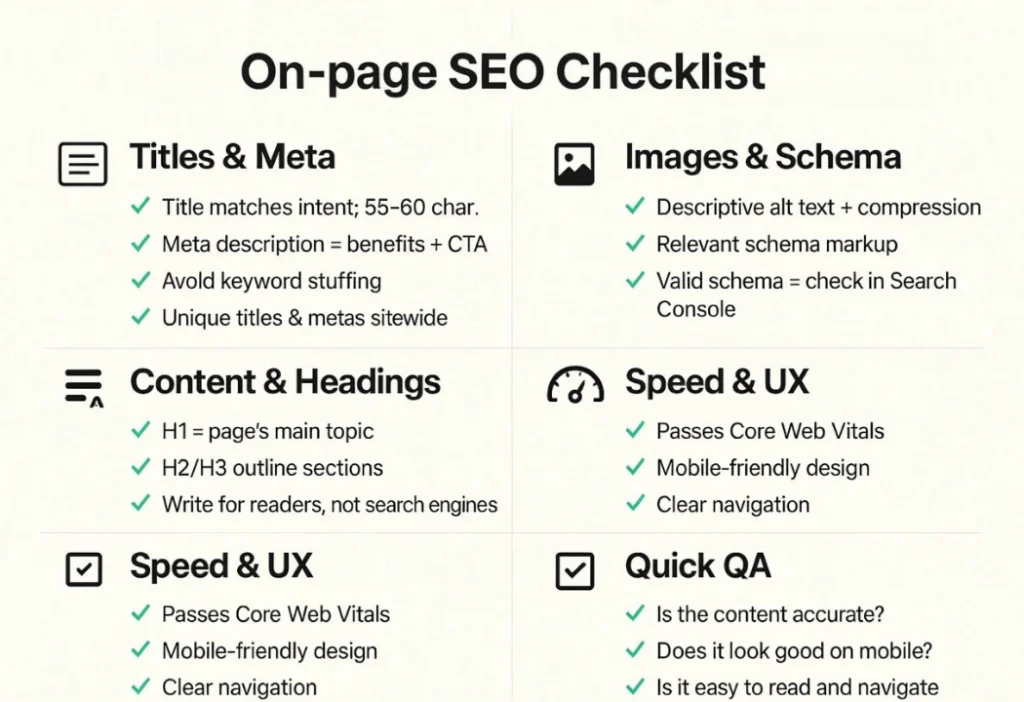
Start with page titles, headings, meta descriptions, URLs, and image alt text. These elements should describe the content accurately and help users understand what each page offers.
For example, a vague title such as “Our Guide” gives little information about the page. A more descriptive title, such as “How to Improve WordPress Website Speed,” sets clearer expectations.
Check that each important page has a clear main heading and a logical heading structure. Review whether the target topic appears naturally in the title and body copy without unnecessary repetition.
Also look for pages with nearly identical titles, missing descriptions, unclear URLs, or headings that do not reflect the content.
Meta descriptions can help explain why a searcher might want to visit a page, although Google may generate a different search snippet. Likewise, adding a keyword to every heading is not a substitute for useful content.
4. Evaluate Content Quality and Search Intent
Content deserves careful attention during an SEO audit because technical fixes alone cannot make an unhelpful article valuable.
Read the most important pages as if you were visiting the website for the first time. Does the content answer the main question? Is the information accurate? Are there practical examples? Does the page offer something useful beyond a collection of general statements?
Compare the content with the likely intent behind the search query. Someone searching for a definition may need a straightforward explanation, while someone comparing services may need pricing details, differences, and decision-making guidance.
Look for:
- Outdated facts or recommendations
- Sections that repeat the same point
- Questions the article leaves unanswered
- Thin pages with little independent value
- Content that no longer matches its title
- Several pages competing for the same search intent
The solution will differ from page to page. Some articles may need a substantial update, while others may work better when consolidated with a closely related page. A useful page may only need a few corrections.
Do not rewrite content merely to make it longer. Update it when doing so improves accuracy, clarity, relevance, or usefulness.
5. Review Internal Links and Backlinks
Links help connect pages and provide context about their relationships.
Start with internal links. Check whether important pages can be reached through relevant links from other pages on the website. Look for broken links, orphan pages that have no internal links pointing to them, and articles that could benefit from links to related resources.
For example, an article about keyword research could link to a guide on creating an SEO content strategy. This gives readers a logical next step and helps them explore the topic in greater depth.
Use descriptive anchor text that explains what the linked page contains. Avoid adding links simply to increase the total number of links on a page.
Next, review the website’s backlink profile using a suitable SEO tool. Look for relevant websites linking to your content, important pages attracting external links, and suspicious patterns that may deserve investigation.
A large number of backlinks does not automatically mean a website has a strong link profile. Relevance, context, and quality matter. Do not disavow links simply because a tool labels them as low quality; investigate the circumstances before taking action.
6. Check Page Speed and Mobile Usability
Visitors should be able to read and interact with a website without unnecessary delays or frustrating layout problems.
Test important pages with Google PageSpeed Insights. Review both mobile and desktop results, paying attention to the recommendations rather than focusing only on the final score.
PageSpeed Insights provides lab diagnostics and, where available, real-user experience data. These two data sources serve different purposes, so a single test should not be treated as a complete picture of every visitor’s experience.
Check the Core Web Vitals metrics:
- Largest Contentful Paint (LCP): How quickly the main content becomes visible.
- Interaction to Next Paint (INP): How responsive the page feels when users interact with it.
- Cumulative Layout Shift (CLS): How much visible content moves unexpectedly during loading.
Also test the website on a mobile device. Check whether text is readable, buttons are easy to use, menus work correctly, and important content is available without awkward horizontal scrolling.
Common improvements include resizing images, reducing unnecessary scripts, enabling suitable caching, and reviewing third-party tools. Make changes carefully and test the affected pages afterward.
7. Analyze Organic Search Performance
Once the technical and content reviews are underway, examine how the website performs in Google Search.
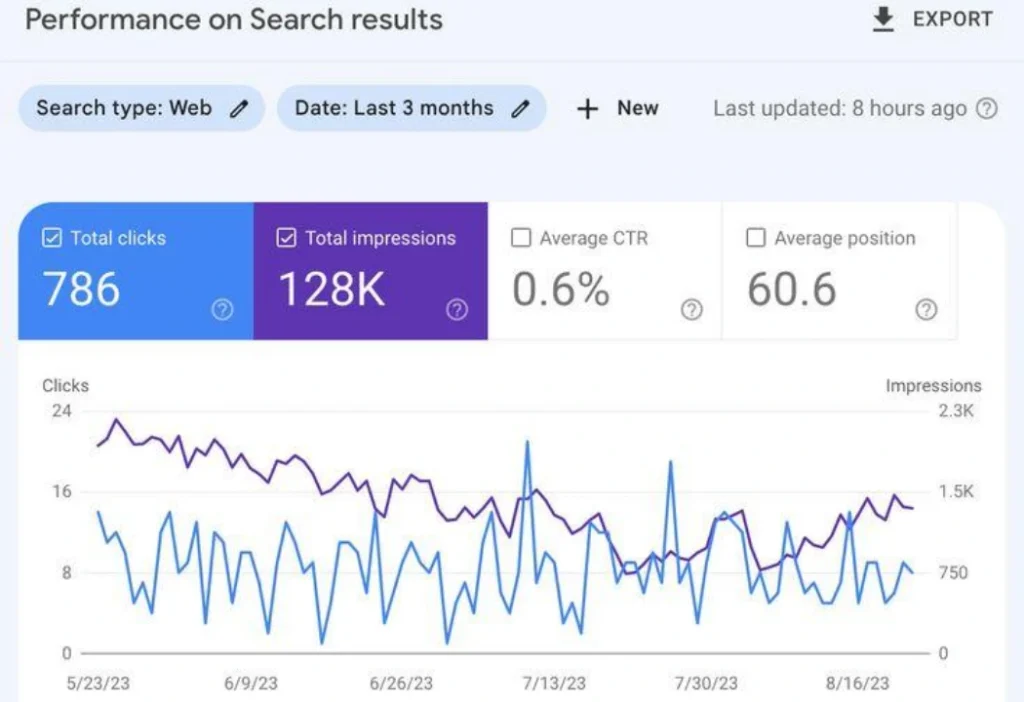
Google Search Console’s Performance report provides data such as clicks, impressions, click-through rate (CTR), and average position. These metrics can help identify pages and search queries worth investigating.
For example, a page receiving impressions but relatively few clicks may benefit from a more relevant title or a clearer description of what the content offers. A page losing clicks over time may need a closer review of its content, search intent, competitors, or indexing status.
Google Analytics can complement this information by showing what visitors do after arriving on the website, depending on how analytics and conversion tracking are configured.
Compare similar periods and account for seasonality, changes in demand, and the amount of data available. A short-term drop does not automatically mean something is wrong.
The aim is to connect search performance with meaningful improvements, not to chase every fluctuation.
Essential SEO Audit Tools
Several tools can help make an SEO audit more manageable.
Google Search Console is useful for reviewing indexing, search queries, clicks, impressions, and other search performance information.
Google PageSpeed Insights helps assess page performance and identify potential improvements for mobile and desktop experiences.
Google Analytics helps website owners understand traffic sources, visitor behavior, and configured conversions.
Website crawling tools can help identify broken links, redirects, missing metadata, and other technical patterns across a site.
Backlink analysis tools can provide information about referring websites and the links pointing to a domain.
You do not need every available tool to begin. Start with the tools that answer your most important questions, then add specialist software if the website’s size or complexity requires it.
Frequently Asked Questions
What is included in an SEO audit?
An SEO audit typically reviews technical SEO, crawling and indexing, on-page elements, content quality, internal links, backlinks, page performance, mobile usability, and organic search data.
Can I conduct an SEO audit for free?
Yes. Tools such as Google Search Console and PageSpeed Insights provide useful information at no cost. A manual review of important pages can also uncover issues. Paid crawling and backlink tools may be useful for more detailed analysis.
How long does an SEO audit take?
The time depends on the size and complexity of the website. A small website can receive an initial review relatively quickly, while a large website may require a more detailed crawl, analysis, and prioritization process.
Does an SEO audit improve Google rankings?
An audit itself does not improve rankings. It identifies potential problems and opportunities. Results depend on the quality of the findings, the changes implemented, competition, and other factors affecting search performance.
What should I fix first after an SEO audit?
Start with issues that prevent important pages from being accessed or indexed, followed by significant technical errors and problems affecting user experience. Then prioritize content and on-page improvements based on their relevance and potential value.
Conclusion
An SEO audit gives website owners a clearer understanding of why a website may be struggling in search and where practical improvements can be made. By reviewing indexing, technical SEO, on-page elements, content, links, page experience, and organic search data, businesses can build a more informed plan for improving their websites.
The most effective approach is to work through the findings in order of importance. Fix critical issues first, improve pages that serve valuable purposes, and monitor the results instead of making changes without a clear reason.
An audit is not about making every tool report a perfect score. It is about making the website easier to discover, understand, navigate, and use.